I was inspired to put together a cheat sheet of git commands I use after watching a YouTube video about how you only need 15ish git commands. Please let me know in the comments below if I am missing out on something super useful!
Everyone already knows
git clone $REMOTE_URL
git add src/*.rs
git commit -m "made changes"
git status
git log
git push origin main
git pull origin main
Often useful
git reflog                          # see WTF you've done that led you to this predicament
git clone --depth=1 $REMOTE_URL     # fast clone (don't fetch the full history)
git add -p                          # interactively select hunks to add
git commit --amend                  # modify previous commit instead of creating a new one
git switch -c feat1                 # create new branch
git reset HEAD^                     # "undo" the last commit (keep changes in filesystem)
git reset README.md                 # "unstage" README.md
git restore README.md               # discard unstaged changes to README.md
git restore :/                      # discard all unstaged changes to tracked files
git restore -s HEAD^ -- README.md   # bring back version of README.md from previous commit
git rebase -i origin/HEAD           # modify & replay commits on top of main branch
git grep "needle" -- "*.rs"         # find "needle" in .rs files
git log -pG "xyz" src/              # show commits that modified "xyz" (regex) in src/ directory
git log -pS "xyz"                   # show commits that changed the count of "xyz" (regex)
git log --stat                      # show which files changed
git diff --stat HEAD~10             # show which files changed in last 10 commits
git diff HEAD~2..HEAD~1 README.md   # show changes in README.md from HEAD~2 to HEAD~1
git stash push                      # store changes (restore later with "git stash pop")
Interacting with Github PRs
# update/create branch PR67 from Github PR #67
git fetch origin pull/67/head:PR67
# fetch changes from Github PR #67 and inspect them in DETACHED HEAD mode
git fetch origin pull/67/head && git reset --hard FETCH_HEAD
Binary search for a change in behavior
git bisect start BAD_COMMIT GOOD_COMMIT
# mark current commit as either good or bad (or skip it if unable to determine)
git bisect good|bad|skip
# quit bisecting
git bisect reset
It's also good to be aware that there is a way to have git bisect use a script to automatically determine if a commit is good or bad. I've never needed it, but it has the potential to save you hours of work if you ever run into a situation where you have a large range of commits to bisect and/or the issue is tedious to reproduce.
Bonus tips
Use tldr
Install a tldr client (I use tealdeer) to quickly refresh your memory on specific git commands. When tldr git-diff doesn't answer your question man git-diff certainly will, although it will take a bit more reading.
Git aliases
You may want to set up git aliases for commonly used commands that are hard to remember. You can set up repository-specific aliases in repo/.git/config, or use the user-wide configuration file at ~/.config/git/config (on Linux). For example in my dotfiles I have an alias git pr upstream 67 that creates a new branch with changes from pull request number 67 in the remote called upstream.
You can also add aliases for urls. For example adding the following to your git config allows you to type git clone gh:Andriamanitra/dotfiles instead of git clone git@github.com:Andriamanitra/dotfiles:
[url "git@github.com:"]
    insteadOf = "gh:"
Human-friendly diffs
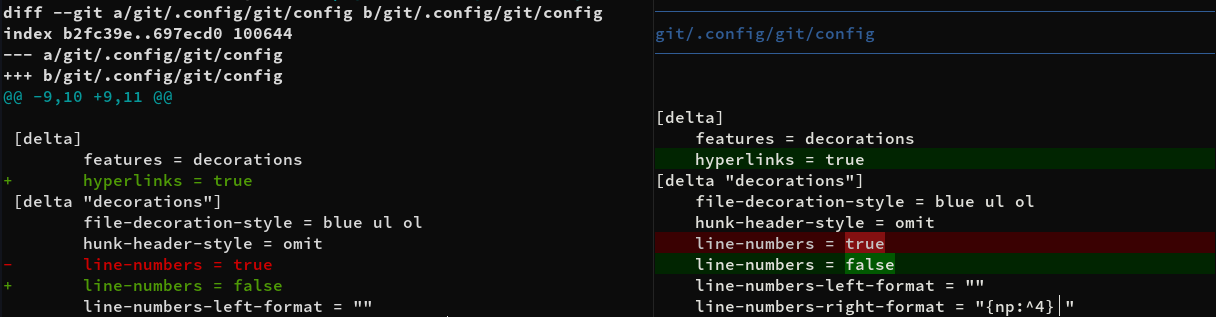
You can replace the default diff from git with something like delta, difftastic or diff-so-fancy to get more control over how it's rendered. The screenshot above shows the default git diff output (on the left) next to one rendered by delta (with my configuration).